In This Topic
Performance
The performance of ™ has been improved in many areas, so the overall feel and use of this new product should be noticeably quicker when placing cabinets, when pressing F8 (Exporting Machining), going into 3D rendered view etc. The Memory Load for larger drawings has also been reduced.
New Features & Enhancements
V12.100.2.5 Production Release
[20260723]
V12.100.2.4
- Dovetail Drawers : Can now use Fixed Sized ‘Pins’
- Polyshape : Text Label added to machining
- StoreMaster Interface updated
- Symbols : Pages updated in line with a new installation
V12.100.2.1
V12.100.2.0
v12.1.00.1.7
- Cabinet Details : Dimensioning pictures updated
- Drawing Properties : Job Setup > About - Customer Care status added
- Drawing Properties : Job Setup > About - Training Videos link added
- Label Tool : New ‘Classic’ tool added
- Textbox Tool : New ‘Classic’ tool added
- Support Ticket Logging : Page format updated
V12.100.1.6
V12.100.1.5
- StoreMaster link improvements
CM-Cabinets
CM-Design 2
- Added White Cone Light
- Add Electric Fireplace Standalone
- Adjusted Icemakers
- Adjusted Long Black Hanging Light
- Adjusted Modern Curved Front Loader
V12.100.1.4
- StoreMaster button added to the Home tab ribbon commands
Example
Clicking on the StoreMaster command will show you the available categories that you can select from and provide instructions on how to proceed.
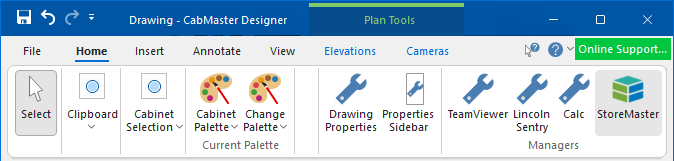
- StoreMaster button removed from Materials Advanced > Managers page, My Setup > Materials Datasources page, Hardware > Managers page
V12.100.1.0
- Standard and Universal Cabinets: Increased use of images to help specify cabinet properties (primarily the dimensions)
Example of Universal
The Reset Dims button will reset to the values set for Universals on the Job Setup > Job Defaults page of the .
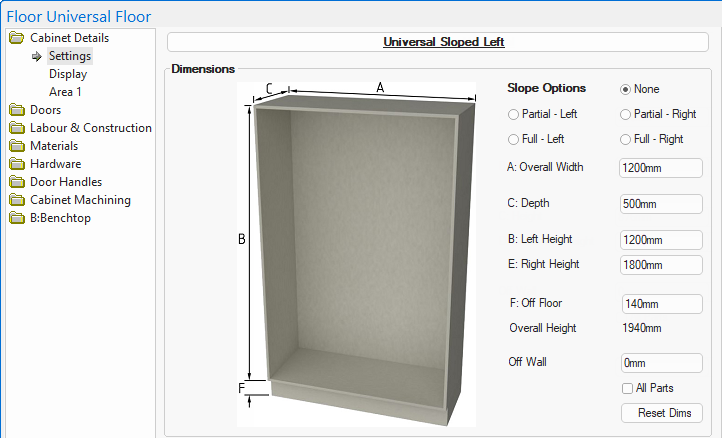
Click to compare to Version 12.0
- Job Checklist
- / Properties : Ability to create a 'Job Checklist' to help in drawing/job management.
Example
Custom definitions can be created on the My Setup > Job Checklist page in the / Properties.
On the Job Setup > Job Checklist page in the , the Notes button allows notes/comments to be added against the item were created in My Setup. As checklist items are checked off, the 'Designer' details (set on the Job Setup > Job Number page) along with the 'Date & Time' (automatically created) are shown.
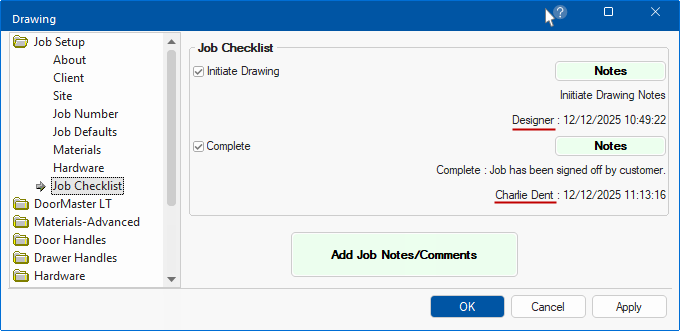
Click to view details of Designer on the Job Setup > Job Number page
- Properties Sidebar : Display SideBar Layout of the Properties, now includes a sidebar for the Drawing itself, as well as the Cabinet sidebar.
- This provides the ability to include the Job Checklist on the Cabinet and Drawing sidebars.
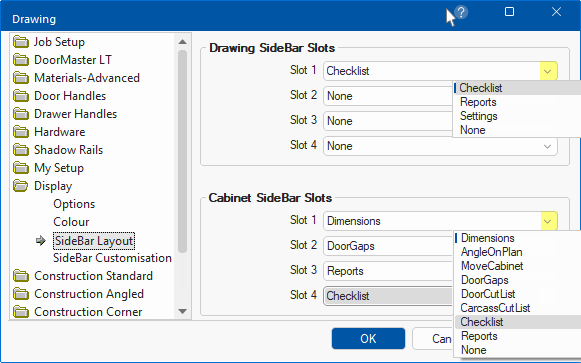
Click to view these setting for the Cabinet and Drawing Sidebars
Bug Fixes
V12.100.2.5
- Glass Doors : 3D renders of plain glass could have a pink hue
V12.100.2.4
- Back Rebates : Into Tops - Not working when Rails used
- DoorMaster LT : Frame adjustments for drawer fonts were not saving on cabinets
- Dovetail Drawers : Can now use Fixed Sized ‘Pins’
- Panelling & Timber Panelling Cabinets : ‘BasedOn’ properties missing
- StoreMaster Interface update
- Tall Corner Universal : Corner Shelves
- Adjusting quantity did not work correctly
- Shelf fixed and adjustable holes misplaced when left or right recesses adjusted
- Universal Cabinets : Pipe chase - Adjustable shelf holes incorrect (now removed)
V12.100.2.3
- 'Polyshape' cabinet was not machining "Routes"
- '4 Vent' custom tables not always working correctly
- 'Additional Elements' editor could error when last Element removed from a 'Category'
V12.100.2.2
- Tall Corner Universal : Causing reporting issues
V12.100.2.1
- Robe Door : Door Gap issues
- Tall Angled Universal : Missing Door Materials page
V12.1.00.1.7
- Tall Corner Universal : Ends to Floor option not working correctly
- Cutlery drawer : Tray model on top drawer not turning off when unchecked
- Ancillary Items : Allowing items with a blank name caused issues
- Universals and Robes : Back support Rails - Machining error
- Machinable Object Manager : Only allowing first hole to be edited
V12.100.1.6
- Floor DrwDoor : Property inconsistencies - causing report issues
V12.100.1.5
- Universals & Robes : With continuous shelf holes along with Drawers and fillers causes application freeze
V12.100.1.4
- Tall Corner Universal : Bifold hinge selection not working correctly
V12.100.1.3
- Ancillary Items : Appearing on Hardware reports when not linked to a Hardware item
- Drawer Cabinets : Quantity Button - Changing quantity with ‘Top’ selected caused error
- Slatwall : Hardware selection for ‘Inserts’ missing and incorrectly configured
- Wall Division 2 : Bottom hinge machining override option was missing
V12.100.1.2
- DoorMaster LT with Panels : Include Kick not working correctly with profile
- Shadow Rail : Support Rail - Tongue and Groove machining incorrect
- Universals and Robes : Drawer Shadow Rails cutout sizing
- Universals and Robes : Standard drawer base fixing holes for the Front could error
- Wall End Panel : Door Material as L not working for ‘Cutout Bottom’
- Wall End Panel : Door Material as L not showing in 3D
V12.100.1.0
- DoorMaster LT : Glass - Being displayed with a pink hue
- RDL Reports : Quantities - Wrongly assuming item quantities were whole numbers
- Robe 2 : ‘Area’ pages were not showing all available options
- Tall Wall Oven : Default oven rail and spacer offsets initially not present
- Tall Wall Oven : Upper carcass base had misaligned boring when machined in top face
